
Most language apps follow a pretty familiar formula. You tap the right answer, type a translation, repeat a phrase out loud, and move on to the next exercise. In this Sensonym Review, we’ll take a closer look at how one app tries to break that mould.
Sensonym does things slightly differently.
Instead, it might ask you to tilt your phone, blow into the microphone, smile at the camera, or physically interact with a scene while learning a new word. On paper, that can sound a little gimmicky.
Sensonym is built around the idea that vocabulary may be easier to remember when you connect it with more than just a translation on a screen. By combining words with movement, sound, visual cues, and interactive stories, it tries to create stronger memories around the vocabulary you are learning.
It is certainly one of the more unusual approaches to language learning we have tested.
So, we tried Sensonym ourselves to find out whether those interactions actually help vocabulary stick, what the app is like to use in practice, and whether the novelty holds up once you have spent some time with it.
Sensonym review: our quick verdict
Sensonym is one of the most distinctive vocabulary apps we have come across, combining stories, movement, and sensory interactions in a way that feels very different from traditional flashcards or language exercises.
Its biggest appeal is that it tries to make individual words memorable by turning them into experiences rather than simply asking you to memorise translations.
| Best for | Visual, story-driven and active learners |
| Languages | 10 |
| Free version | Yes |
| Premium | £9.99/month or £49.99/year on iOS |
| Biggest strength | A genuinely different approach to learning vocabulary |
| Biggest weakness | The opening sequence of the app is longer and can be slightly frustrating to move along |
| LLH rating | 7/10 |
What is Sensonym?
Sensonym is a vocabulary-focused language-learning app built around interactive stories and what is known as embodied learning.
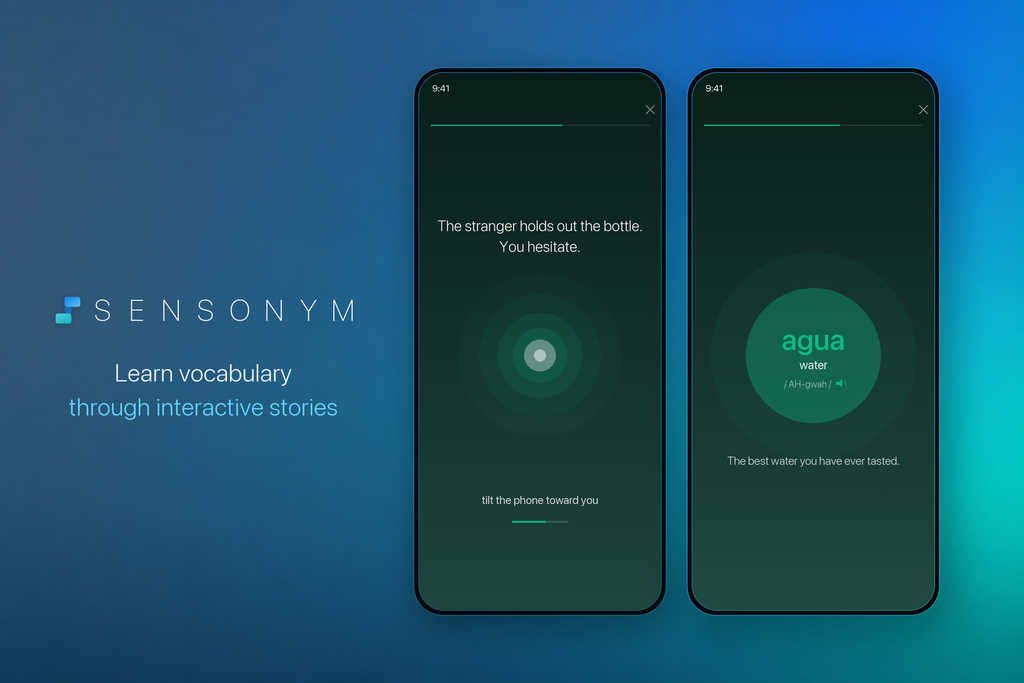
For example, instead of simply seeing that “forward” means “adelante” in Spanish, you might hear the word, see it used in context, and physically tilt your phone forwards as part of the scene.
The idea is that creating several different associations with a word can make it easier to recall later. You are not just remembering a translation but also what you saw, heard, and did when you encountered it.
Sensonym currently supports 10 learning languages: English, Spanish, French, German, Turkish, Indonesian, Malay, Korean, Chinese, and Japanese.
It is not designed as a traditional step-by-step language course. The focus is much more specifically on helping learners encounter and remember vocabulary through stories, context, and physical interaction.
How we tested Sensonym
For this review, we wanted to do more than simply download Sensonym, complete a couple of interactions, and give a first impression.
We tested the app using Spanish at the intermediate level, working through the courier, through the floor, and through two passengers’ stories and spending around two hours using the app. We also completed the review activities afterwards rather than judging Sensonym solely on the stories themselves.
More importantly, we wanted to test the main idea behind the app: whether its combination of movement, sound, and context actually makes vocabulary easier to remember.
To do that, we selected 10 words we encountered through Sensonym and compared them with 10 unfamiliar words learned using ordinary flashcards. We then left both sets alone and tested ourselves again 24 hours later to see how many we could recall without help.
It is a small experiment rather than a scientific study, but it gave us a much better indication of whether Sensonym’s unusual approach was actually helping the vocabulary stick.
How Sensonym works
Sensonym feels quite different from a conventional language-learning app from the moment you start using it.
Rather than working through a fixed sequence of lessons, you choose a language and then learn vocabulary by progressing through interactive stories.
1. Choose your language
The first step is choosing the language you want to learn and your approximate level.
Sensonym supports learners across different ability levels, so the vocabulary and stories available to you are not all aimed at complete beginners. Once you are set up, you can start exploring the story library rather than being placed into a traditional lesson path.
2. Choose a story
This is where Sensonym starts to distinguish itself.
Instead of organising vocabulary into familiar categories such as food, travel, or household objects, much of the learning takes place inside fictional stories.
These currently span genres including survival, science fiction, Cold War thrillers, romance, and mystery, with stories available at different difficulty levels.
That makes the vocabulary feel less disconnected than it can in a traditional word list. You are learning words because something is happening within the story, rather than because the app has decided it is time to memorise 15 pieces of kitchen vocabulary.
3. Learn vocabulary inside the story
As you progress, Sensonym introduces new words as part of what is happening on screen.
You might hear a word spoken, see its meaning, and then encounter it again within the context of the scene. This is an important part of Sensonym’s approach because the vocabulary is attached to a particular moment rather than presented in isolation.
For example, imagine learning the Spanish word adelante. A conventional flashcard might simply show you:
adelante = forward
Sensonym can instead introduce the word within a scene, play the pronunciation, and then connect it to an action involving moving forwards.
The word is still being taught, but there is much more surrounding it for your brain to associate with later.
4. Interact physically with the word
The physical interactions are the part of Sensonym that initially feels the most unusual.
Depending on the vocabulary and story, the app can ask you to do things such as tilt your phone, blow into the microphone, clap, smile at the camera, trace a shape on the screen, or interact with features of the device itself.
For example, you might tilt your phone to represent drinking, blow towards the microphone to interact with a fire, or wipe across the screen to clear frost.
Not every interaction is quite so literal, but the principle remains the same: Sensonym wants you to do something while learning the word.
This is also where the app either becomes genuinely memorable or starts to feel gimmicky, depending on how naturally the action connects with the vocabulary. We will come back to that later in the review.
5. Review what you’ve learned
The experience does not end when you finish a section of the story.
Sensonym gives you opportunities to revisit vocabulary you have already encountered, helping reinforce the words after their initial introduction. This matters because even a particularly memorable interaction is unlikely to make a new word permanent after seeing it once.
The combination is therefore less about replacing repetition entirely and more about changing the first memory you create around a word. You encounter it within a story, associate it with an action or sensory cue, and then reinforce it afterwards through review.
Whether that produces better long-term recall is the more important question, and that is what we wanted to test.
Does Sensonym actually help you remember words?
Sensonym is fun to use, but the more important question is whether all that movement actually helps vocabulary stick.
What Sensonym is claiming
Sensonym’s idea is that words may be easier to remember when they are connected to several cues at once.
Instead of only seeing a translation, you might hear the word, see it inside a story, and perform a related action. In theory, that gives your brain more ways to retrieve it later.
The theory behind it
This connects with the idea of embodied cognition, which suggests that memory and learning can be influenced by physical experiences as well as what we see and hear.
Research into language learning has found that pairing vocabulary with meaningful gestures can improve recall, although simply adding movement does not automatically make learning better.
Other studies have found positive effects from gesture-based vocabulary learning, but results are not always consistent. The type of vocabulary, the activity, and how memory is tested can all influence the outcome.
So, there is genuine research behind Sensonym’s approach. That does not mean Sensonym itself is proven to improve memory, which is why we wanted to test it ourselves.
What happened in our test
We learned 10 unfamiliar words through Sensonym and another 10 using normal flashcards. After 24 hours, we tested how many we could remember without looking at either app.
We remembered 6/10 Sensonym words compared with 5/10 flashcard words.
One of the most interesting things to look for is whether you remember the action or story first and whether that actually helps bring the word back.
An interaction can be memorable without necessarily making the vocabulary itself memorable. When the action fits the word well, however, it may provide an extra clue that helps with recall.
Our test is far too small to prove that Sensonym works better than flashcards, but it gives us a much better basis for judging the app than novelty alone.
Is Sensonym actually fun to use?
Yes, at least at first.
Sensonym feels more like an interactive story than a traditional language lesson. The music, visuals, spoken vocabulary, and narrative give you a reason to keep going beyond simply completing another exercise.
The physical interactions help too. Tilting your phone or interacting with a scene can feel genuinely satisfying when the action matches the word. When it does not, it risks feeling like a gimmick.
The bigger question is whether that novelty lasts.
Fun and effective are not the same thing, so we judged Sensonym on both. The stories are intriguing; it is worth it if you have time. There are actions that are linked to each word, so despite it helping you to remember and memorise the words, it’ll take longer.
For us, the real test was simple: did we actually want to open it again the next day?
The stories are probably Sensonym’s secret weapon
The sensors are what make Sensonym look different, but the stories may be doing more of the work.
A flashcard gives you:
desaparecer = disappear
Sensonym can give you the same word inside an actual situation. Someone has disappeared, the story has built some tension around it, and you encounter the word as part of that moment.
That context matters.
You are no longer trying to remember an isolated translation. You are remembering what was happening, what you saw and how the word fitted into the scene.
For some vocabulary, that may be more useful than the physical interaction itself.
If Sensonym has a lasting advantage over ordinary flashcards, the storytelling may be a bigger part of it than the sensors.
Sensonym’s movement system: clever or gimmicky?
Sometimes, it is genuinely clever. Other times, it feels like the app is trying a little too hard to make you move.
When the interaction makes sense
Sensonym works best when the movement naturally matches the word. Tilting your phone to represent drinking or wiping frost from the screen creates an obvious connection between the action and the vocabulary.
Those are the moments where the idea feels strongest.
When it feels forced
Not every word lends itself to a physical interaction. When the connection is weak, the gesture can feel more like a mini-game than something that actually helps you remember the vocabulary.
That does not make it useless, but it does make the experience less convincing.
Does the novelty wear off?
This is the real test.
The first few interactions are memorable simply because they are unusual. After several sessions, that effect matters less.
Sensonym’s best interactions make you wonder why more language apps do not use movement. Its weakest ones remind you exactly why they don’t.
What Sensonym does well
Sensonym’s biggest strength is that it makes vocabulary feel like something you experience rather than something you simply memorise.
It gives words context
The stories give vocabulary a setting, a purpose, and something to associate it with. That can make words feel much less abstract than they do on a flashcard.
The best interactions are genuinely memorable
When the movement matches the meaning well, Sensonym creates a strong connection between the word and the action.
It feels different
Sensonym does not feel like another Duolingo clone or flashcard app. The combination of stories, movement, and sensory cues gives it a clear identity.
The presentation is strong
The visuals, audio, and music help the stories feel polished rather than like a basic vocabulary exercise with a few gestures added on.
It is a good antidote to flashcard fatigue
If you are tired of repeatedly swiping through word lists, Sensonym offers a much more active way to learn.
What Sensonym could improve
Sensonym has a genuinely interesting idea, but there are still a few areas where it feels limited.
The story library is still relatively small
The current catalogue is not huge, which means heavy users may work through the available content faster than they would on larger language platforms.
It is mainly a vocabulary tool
Sensonym is good at helping words feel memorable, but it is not a complete language course. Grammar, extended speaking practice, and broader progression are not its main strengths.
Advanced learners may want more depth
The concept works well for vocabulary acquisition, but more advanced learners may eventually want harder language, more nuanced usage, and greater control over what they study.
Review could be stronger
The initial interaction can make a word memorable, but long-term retention still depends on seeing it again. A deeper spaced-repetition system could make the learning feel more complete.
Some interactions are awkward in public
Tilting your phone is one thing. Blowing into it or making gestures on a busy train is another. Sensonym is probably easier to use somewhere you are comfortable being a little conspicuous.
Accessibility needs consideration
A learning system built around movement, microphones, cameras, and other sensors will not work equally well for everyone. More alternatives to physical interactions would make the approach more flexible and accessible.
What languages does Sensonym support?
Sensonym currently supports 10 learning languages:
- English
- Spanish
- French
- German
- Turkish
- Indonesian
- Malay
- Korean
- Chinese
- Japanese
That is a solid range, particularly for a relatively young app, although the amount and difficulty of content may not be identical across every language.
If you are choosing Sensonym for a specific language, it is worth checking how many stories and levels are currently available before paying for Premium.
How much does Sensonym cost?
Sensonym has a free version, but you will need Premium to unlock the full experience.
Sensonym Free vs. Premium
| Feature | Free | Premium |
| Download the app | ✓ | ✓ |
| Start stories | ✓ | ✓ |
| Complete full stories | Limited | ✓ |
| Access the full story library | – | ✓ |
| Price | £0 | £9.99/month or £49.99/year* |
*UK iOS pricing checked September 2026.
The free version is useful for seeing whether you actually enjoy the format before committing, which is particularly important with an app as unusual as this one.
Is Sensonym Premium worth it?
For learners who enjoy story-based learning, want a more memorable way to build vocabulary and expect to use the app regularly, Sensonym Premium can be good value.
The annual plan is the stronger option. At £49.99 per year, it works out at roughly £4.17 per month, compared with £9.99 if you pay monthly.
For casual users, advanced learners who want deeper grammar or speaking practice, or anyone who is unsure whether the movement-based format will hold their attention, Premium is harder to recommend straight away.
Our advice is simple: try the free version first. If you find yourself wanting to continue the stories, the annual plan makes much more sense than paying month to month.
Sensonym vs Duolingo
Sensonym and Duolingo are not really trying to do the same thing.
Sensonym is strongest when it comes to vocabulary, context, storytelling, and physical interaction. It is designed to make individual words more memorable by connecting them with scenes, actions, and sensory cues.
Duolingo is much stronger as a structured language course. It offers far more content, clearer progression, broader grammar coverage, and a system built around daily habit formation.
Sensonym makes more sense as a complementary tool: something you use alongside a broader course when you want to build vocabulary in a more active and memorable way.
Sensonym vs Anki and flashcards
Sensonym is arguably a more interesting comparison with Anki and traditional flashcards than with Duolingo, because they are all trying to solve the same basic problem:
how do you actually remember new words?
| Sensonym | Anki/flashcards | |
| Speed | Lower | High |
| Context | High | Usually low |
| Physical interaction | High | None |
| Vocabulary volume | Lower | Essentially unlimited |
| Customisation | Lower | Very high |
| Memorability | Depends on the interaction | Strong SRS advantage |
Flashcards are faster, more flexible, and better suited to learning large amounts of vocabulary. Anki also gives you far more control over what you learn and when you review it.
Sensonym trades some of that efficiency for context and memorability. Instead of repeatedly showing you the same word, it tries to give that word a story, an action, and a moment you can associate with it.
For serious vocabulary volume, Anki is still the stronger tool. For learners who struggle to make isolated flashcards stick, Sensonym offers a much more engaging alternative.
Interesting and genuinely useful.
Sensonym pros and cons
Pros
- Genuinely different approach to vocabulary learning
- Stories give new words useful context
- Physical interactions can make some vocabulary more memorable
- Strong visuals, audio and overall presentation
- Good option for learners bored of flashcards
- Free version lets you try the format before paying
Cons
- Story library is still relatively limited
- Not a complete language course
- Some interactions can feel forced or repetitive
- Less useful if your main goal is grammar or conversation practice
- Certain movements may feel awkward to use in public
Sensonym review: our final verdict
So, is Sensonym a gimmick?
At first, it can sound like one. Most language apps do not ask you to blow into your microphone, tilt your phone, or physically interact with a scene just to learn a word.
But dismissing Sensonym for that reason would miss the more interesting idea underneath.
Its strongest moments come when movement, memory, and story all reinforce each other. A word is more likely to stand out when you have heard it, seen it in context, and done something connected to it.
- Vocabulary: 7/10
- Engagement: 7/10
- Content: 6/10
- Value: 7/10
- Overall: 7/10
If you are bored of flashcards and want a more active way to build vocabulary, Sensonym is well worth trying. We would just recommend starting with the free version first to make sure the format works for you.
Sensonym FAQs
Is Sensonym free?
Yes. You can download Sensonym and try parts of its stories for free, although full access requires Premium.
How much does Sensonym cost?
Sensonym Premium costs £9.99 per month or £49.99 per year on iOS in the UK.
Is Sensonym available on Android?
Yes. Sensonym is available on both Android and iOS.
What languages can you learn with Sensonym?
Sensonym currently supports English, Spanish, French, German, Turkish, Indonesian, Malay, Korean, Chinese and Japanese.
Does Sensonym actually work?
Sensonym’s approach is supported by research into gesture, context, and embodied learning, although the app itself has not been independently proven to improve vocabulary retention.
Is Sensonym good for beginners?
Yes, particularly for beginners who want to build vocabulary through stories and context rather than memorising isolated word lists.
Can Sensonym replace Duolingo?
Probably not for most learners. Duolingo offers a much broader and more structured course, while Sensonym works better as a complementary vocabulary tool.
Is Sensonym good for learning vocabulary?
Yes. Vocabulary is where Sensonym is strongest, particularly when its stories and physical interactions create a clear connection with the word being learned.
Does Sensonym work offline?
Yes. Downloaded content can be used offline according to Sensonym’s Google Play listing.